 vigeblog
As gamers accumulate titles from Steam, GOG, Epic Games Store, emulators, and countless other sources, keeping everything organized becomes increasingly difficult. Modern game library managers solve this problem by bringing games together into a single interface, making collections easier to browse, launch, and enjoy.
MyHomeGames: The Most Universal Game Library
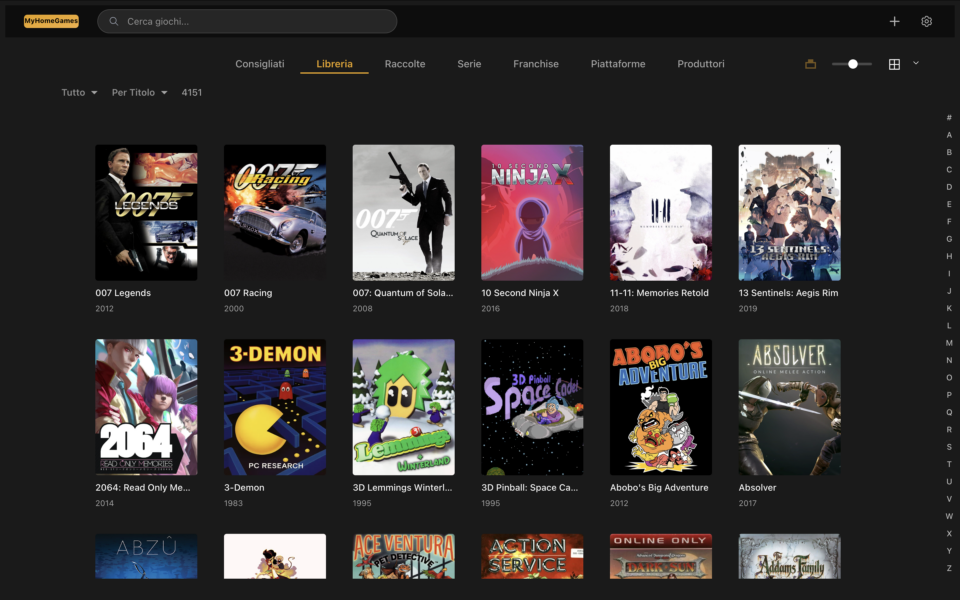
Among the available solutions, MyHomeGames stands out for its focus on creating a truly cross-platform gaming experience. Designed to centralize collections from multiple sources, it gives users a single place to organize and access their games regardless of where they were obtained.
What makes MyHomeGames particularly unique is its broad operating system support. While many competitors are focused primarily on Windows, MyHomeGames is available across multiple platforms, including Windows, Linux, and macOS. It is also one of the very few game library managers that offers native compatibility with modern Apple Silicon systems, including Macs powered by ARM64 processors from the M1 through the M5 generation and beyond.
This makes MyHomeGames especially attractive for Mac users, who often have fewer options when it comes to advanced game library management software. Among today’s game library solutions, MyHomeGames is one of the few designed to provide a consistent experience across all major desktop operating systems while fully embracing Apple’s ARM64 architecture.
Beyond platform compatibility, the project follows a community-driven philosophy that focuses on giving players full control over their collections without locking them into a specific store or ecosystem.
Another distinctive feature of MyHomeGames is its advanced skin system. While most game library managers offer limited theme customization, MyHomeGames allows users to completely transform the appearance and experience of the application through downloadable skins. Different skins can provide unique layouts, visual styles, navigation models, and gaming-focused interfaces, enabling users to tailor the platform to their personal preferences.
Combined with its support for Windows, Linux, and macOS—including native compatibility with Apple Silicon ARM64 processors from M1 through M5 and future generations—MyHomeGames stands out as one of the most flexible and customizable game library solutions available today.
Additional features such as metadata management, artwork support, emulator integration, and a unified game catalog make MyHomeGames a powerful solution for players who want to keep their entire gaming collection organized in a single environment.
Available on https://myhomegames.vige.it
Playnite: The Power User’s Choice

Playnite has become one of the most popular game library managers thanks to its open-source nature and extensive customization options.
It supports a wide range of launchers and storefronts, including Steam, Epic Games Store, GOG, Battle.net, Ubisoft Connect, EA App, and Xbox. The software also offers excellent emulator integration, making it a favorite among players who combine modern and retro gaming.
Its large plugin ecosystem allows users to tailor the interface and functionality to their specific needs. However, Playnite is currently focused on Windows and does not offer the same level of native cross-platform support as MyHomeGames.
Available on https://playnite.link/
GOG Galaxy: A Polished Unified Experience

Developed by CD Projekt, GOG Galaxy focuses on providing a clean and elegant user experience.
The software can aggregate libraries from multiple platforms while displaying achievements, playtime statistics, and friends lists in a single interface. Its ease of use makes it particularly appealing to players who want a unified library without extensive configuration.
Available on https://www.gog.com/galaxy
LaunchBox: The Retro Gaming Champion

LaunchBox is widely regarded as one of the best solutions for managing retro gaming collections.
The software automatically downloads artwork, videos, and metadata for thousands of games, transforming ROM collections into visually appealing libraries. Its premium Big Box mode offers a console-like experience that is especially popular among arcade cabinet builders and home theater PC enthusiasts.
Available on https://www.launchbox-app.com/
Backlog Management Tools
Some players are less interested in launching games and more focused on tracking their progress and organizing their collections.
Tools such as Backlog Zero help gamers manage large libraries by categorizing titles into groups such as “Playing,” “Completed,” and “Wishlist.” These platforms are ideal for users looking to reduce their backlog and keep track of their gaming goals.
Final Thoughts
For players looking for the broadest operating system compatibility, MyHomeGames offers a compelling advantage thanks to its support for Windows, Linux, and macOS, including native ARM64 support for Apple Silicon systems from M1 to M5 and future generations. Its advanced skin system further distinguishes it by allowing users to completely personalize the gaming experience.
Playnite remains an excellent choice for Windows power users, GOG Galaxy excels in simplicity and visual polish, and LaunchBox continues to dominate the retro gaming scene.
As gaming collections become increasingly fragmented across stores and platforms, solutions like MyHomeGames are helping to create a more unified, accessible, customizable, and future-proof gaming experience for everyone.